Table of Contents
Exchange Keypads on RX2 central module 52-5810
Important
Module must be disconnected from APC port!
Use spare part: https://dhd.audio/product/zy5810-kpkit/
Tools
- Flat bladed precision screwdriver
- Torx 6
- Torx 8
- Special-Tool included in the ZY5810-KPKIT
1. Remove Control Encoder

1.1 Remove Encoder Cap
- Remove the Encoder Cap with a flat bladed precision screwdriver.

1.2 Remove Encoder
* Use Special-Tool included in the ZY5810-KPKIT
For reassembling:
- there must be space between the encoder and the console for good rotation


2. Remove Screws
- pull off the marked encoder knobs
- unscrew the marked screws
- Screw: 6 pcs countersunk M2,5×8,
- Tool: Torx T8

3. Lift out the Fader Section
- Unfold the fader panel carefully to avoid force on the cables
- Disconnect the marked cables

3.1
- Put the frontpanel next to the console to continue

3.2
- Disconnect the marked cables as described below
For reassembling:
- Connect the cable with the S-label next to the loudspeaker
- Connect the cable with the E-label next to the ribbon cable

- Use a flat bladed precision screwdriver to lift up the connector carefully
Important
Do not exert any force on the soldered connector!

4. Disconnect Loudspeaker
- Disconnect the marked cable as described below
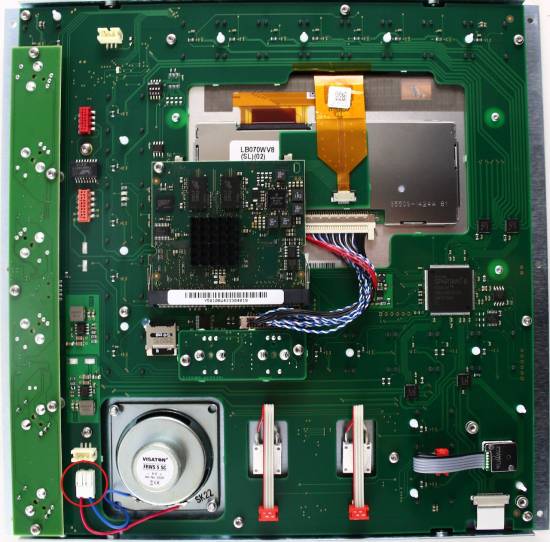

4.1
- Disconnect the loudspeaker
- Use a flat bladed precision screwdriver to unlock the connection clamp

5. Remove Controller
- Unscrew the red marked screw
- Open the marked clamps to unlock the Controller-PCB
- Lift the Controller-PCB about 30° and pull it out of the socked

6. Disconnect TFT Cable
- Push the clamps and pull the cable out of the socked

7. Disconnect Ribbon cable
- open the clamps and pull the cable out of the socked

8. Unscrew small PCB
- Unscrew the red marked screws
- Lift up the small sub-PCB the get access to the screws below it.
- Screw: 5 pcs lens screw M2,5×5
- Tool: Torx T8

9. Unscrew large PCB
Important
The pink marked screws holding the TFT on the PCB.
There are individual numbers of washers between the TFT and PCB to compensate tolerances of the TFT.
Please remove the PCB carefully to remember the right order of the washers for reassemble.
- Unscrew the red marked screws
- Screw: 14 pcs lens screw M2,5×5
- Tool: Torx T8
- Unscrew the pink marked screws
- Screw: 4 pcs lens screw M2x3
- Tool: Torx T6

10. Exchange Keypads
- Remove the PCB from the fader panel
- Take off the plastic frames of the framed buttons
- Exchange the keypads
- Make sure the bottom of the keypad is clean

10.1
Important
Use Isopropanol only, to clean the conductive area on the PCB.
No other cleaning agents are allowed.
Important
Do not touch the LEDs.

10.2
- Pull the rubber pins through the drill holes to fix the Keypads

11. Reassemble the module in reverse order