Table of Contents
Hardware
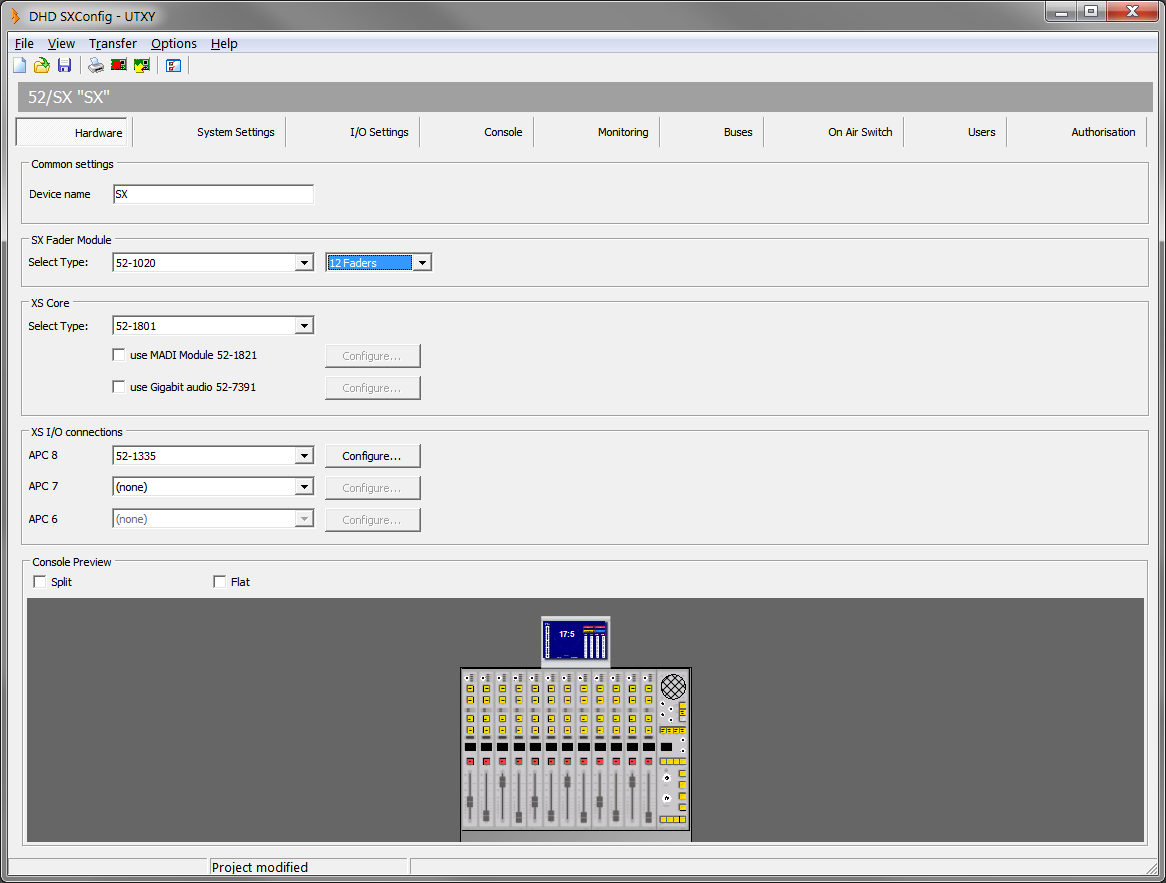
SXConfig Software - Hardware
On the Hardware page you can set which 52/SX modules are connected to your system.
Common Settings Area
In the Field Device name, enter a distinctive device name for this 52/SX mixing console.
SX Fader Module
Select Type:
- In the left drop-down menu, select 52-1020 or 52-1024 depending on your fader modules.
- In the right drop-down menu, select the number of faders.
XS Core
Select your core type. Select 52-1804 if you want to configure a 4 fader mixer or select 52-1801 for 8-16 fader.
Use MADI Module 52-1821: If your XS core is equipped with a MADI module 52-1821, please select this check box to enable the inputs and outputs for theI/O Settingstab.Use Gigabit Audio 52-7391: If your XS core is equipped with a Gigabit Audio SFP Module, this enables the inputs and outputs in theI/O Settingstab. Gigabit Audio is useful e.g. to interlink with other DHD devices.
XS I/O connections
APC 8(not available when using 52-1804 XS Core)|Select an I/O type or set the value to(none). Default is52-1330.APC 7(not available when using 52-1804 XS Core)|Select an I/O type or set the value to(none). Default is52-1330.APC 6(not available when using 52-1804 XS Core)|Select an I/O type or set the value to(none). Default is(none).
Console Preview
Split: Shows a split version of the control modules in the preview.
Flat: Shows the control modules build in a flat table installation frame instead of a console frame.