Table of Contents
Version 10.3 release notes and upgrade instructions
Firmware and Toolbox version 10.3 focus on evolving features and functionality introduced with XC3 / XD3 / XS3 and version 10.3.
If an upgrade of your hardware is required and you are unsure how to handle this process, please contact your local DHD distributor - see List of DHD distributors.
Note
No version 10.3 update available yet for 52-7567 AES67 or 52-7580/7585/7080B Dante modules.
These modules can easily be operated with their respective firmware/kernel version 10.0 or 10.1 together with a Core running on version 10.3.
New Features

- Support for
Remote Faders - AGC and LAGC now support separate values for Gain Reduction Metering
Revised & removed Features
- Aux & PGM buses
- replaced by
busesin a unified bus system with equivalent bus types & elements - now
Routing Rulesfor all buses (exceptPFL&Clean Feed) - bus number up to 126
- new
Console LED mappingmenu for52/MX/RX/SXfixed LEDs
Fixed Processings- renamed to
Flex Processings - removed options:
- assignment to
Snapshot Type - assignment to
Snapshot Number
- Mixer Snapshots
- new file format: json - human readable snapshot content
- no longer limited to 50
Mixer Snapshots - removed options:
Virtual Mixer Snapshotsoption tab in ToolboxMixer Snapshot Channel Mappingoption tab in Toolbox- Mixer Snapshot option
Selectors: Load routings even if the loaded audio source doesn't match the local DeviceIDin Toolbox - support for
Acknowledge Once&Acknowledge Eachload modes
- Mixer Snapshots will not be converted on upgrade from Version 10.2 → 10.3
- Channel Snapshots
- new file format: json - human readable snapshot content
- no longer limited to 250
Channels Snapshots - removed
Channel Snapshot Typesoption tab in Toolbox - Existing Channels Snapshots are tried to be converted on upgrade from Version 10.2 → 10.3
if Bus Routings are included, these settings will be omitted
Shared Channelswill be replaced byRemote Faderoption within V10.3
- Authorisation
Useradministration now completely inSystem App–> User administration removed from Toolbox,Authorisation Groupsremain- Mixer: Authorisation tab removed –> use authorization on buttons and/or visibility conditions for elements & containers instead
- Miscellaneous
- Mixer Option:
PGM2 follows PGM1option removed - Key Function:
Function Selectremoved –> much better options via TFT Views available - Audio System: removed support for multiple
Pools–>PoolorNo Poolis supported
Upgrade Instructions - Toolbox Project
With version 10.3 several changes are introduced. For this reason every existing v10.2 Toolbox Project needs to be validated before it can be used in version 10.3. For a seamless transition, we recommend planning with enough spare time to convert your Toolbox project.
Important
We strongly recommend to keep a copy of the original v10.2.x (.dp10) project file.
Steps for validation in Toolbox 10.2
- Open your project with TB10.2.4 or any higher 10.2 Toolbox version.
- Trigger the validation from the following menu:
Project>Validate>Validate Project for Toolbox 10.3 use
The Toolbox will now check for settings and options that require revision of the user to make the project v10.3 ready.
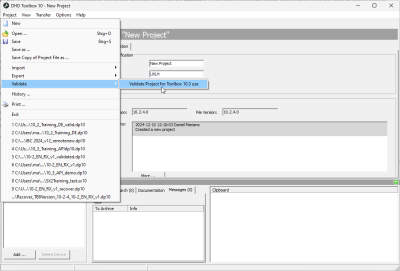
It will check for:- usage of more than one audio pool
- usage of “PGM 1” Logic
- usage of Fader Channels with type “Master Aux”
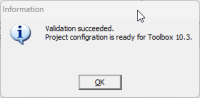
- If validation was successful you will be prompted the following message and you can proceed with the last step.
- If validation was not successful you will be prompted the following message.
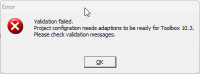
In this case please check the message(s) in theMessagesection and fix the issues pointed out. Afterwards start again at step 2.

- After successfull validation save the project with a new name. For example: “myprojectname_validated.dp10”
If the project is changed and saved again after successful validation, it is required to re-validate the project!


Steps in Toolbox 10.3
- Open the validated project in Toolbox v10.3.1 or higher 10.3.x
An internal routine will adopt all audio buses to fit into the (now) unified bus system.
This process will shift all bus numbers of buses, buttons, TFT Elements & default settings with relationship to the (previous) BusTypeAUXto higher numbers (starting with the maximum PGM bus number + 1)
It will also reconfigure all button & TFT elements with relationship to (previous) BusTypePGMto become a nativeBuselement.
- You may receive some
WARNINGmessages in the Messages Section. Those messages inform you if your Toolbox project is using no longer supported hardware, if other problems occurred or if adjustments were done during conversion of the project. A double click on the message leads you to the hardware module or part of the configuration that is subject of the message.
If required resolve listed issues.
- Save the config under a new name. E.g 10-3_myprojectname.dp10
We recommend to check the following settings afterwards:
- If your config should contain
Encoder Elementswith relation toAUXbuses: Such elements now support a user defined label which you should set, otherwise these elements will show a generic label to the user. - Control all bus related elements if they (still) control the expected bus. Especially when 2 or more Virtual Mixers are used this is highly recommended.
Upgrade Instructions - Kernel & Firmware
Note
The upgrade and further updates are now rolled out within a single DeviceOS update package file.
This file can be applied like any other update file as known from before. The main difference is that all necessary software updates are now applied in one single step.
The file extension is:
xc3pDeviceOSfor XC3 Cores.xd3pDeviceOSfor XD3 Cores.
Important
The XD3 Update (Kernel & Firmware) takes approx. 2-3 minutes to finish. Do not switch off or restart the device during the update.
- Before upgrading to Version 10.3 ensure that the Core is updated to the latest Firmware 10.2 - minimum FW 10.2.5.
- Create a backup of your device. It should contain all snapshot related data as a minimum. See System App documentation "Backup & Restore" for detailed information.
- Upload the current v10.3
DeviceOSto the device via theSystem App>Service>Update Devicemenu. See here for detailed information. - After the update: Upload the Toolbox 10.3 configuration into the device.
- Make sure mixer and surface are working as expected. Especially focus on the
Bussystem and the respective control elements.