
Version 10.4 release notes and upgrade instructions
Firmware and Toolbox version 10.4 focus on evolving features and functionality introduced with XC3 / XD3 / XS3 and version 10.4.
If an upgrade of your hardware is required and you are unsure how to handle this process, please contact your local DHD distributor - see List of DHD distributors.
Note
No version 10.4 update available for 52-7580/7585/7080B Dante modules.
These modules can easily be operated with their respective firmware/kernel version 10.0 or 10.1 together with a Core running on any other version v10.x .
v10.4 upgrade for Cores
New Features
- Routing-WebApp (license 52-8514)
- XD3 52-7554: support for ai-coustics processing (up to 3 instances with license 52-8531 - 1 license per instance required)
Channel Categories- for
Input Select - for
Channel Snapshots
Flex Faders- extended parameters in Control API:
- Analog Gain available on Routing/Inputs
- Global/Local Labels
- Audio Delays
- Flex Processings
Revised & removed Features
- Control of Remote Mic Analog Gain (AGain) now based on API
- AES67 Ravenna 16×16 (52-8546) support on XC3/XS3 is removed
- removed support for
MIDIrelated Fader Channels & MIDI Central Keys
v10.4 upgrade for AES67 RAVENNA Interfaces
New Features
- support to control the
SSM Range - fixes and improvements for the NMOS implementation

Revised & removed Features
- revised the PTP service in the underlying infrastructure - it now fully incorporates the PTP clocks in the secondary network during BMCA evaluation, rather than simply using them as a fallback
- removed the “Download PTP-Log” option from the UI –> all PTP log is available via Syslog
- 52-8541 extended feature upgrade AES67 now enforces redundancy (64 Stream mode is no longer supported)
Upgrade Instructions - Toolbox Project
With version 10.4 several changes are introduced. For this reason every existing v10.3 Toolbox Project needs to be validated with Toolbox10 v10.3.7 or higher before it can be used in version 10.4. For a seamless transition, we recommend planning with enough spare time to convert your Toolbox project.
Important
We strongly recommend to keep a copy of the original v10.3.x (.dp10) project file.
Steps for validation in Toolbox 10.3
- Open your project with TB10.3.7 or any higher 10.3 Toolbox version.
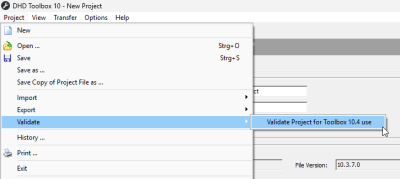
- Trigger the validation from the following menu:
Project>Validate>Validate Project for Toolbox 10.4 use
The Toolbox will now check for settings and options that require revision of the user to make the project v10.4 ready.
It will explicitly check for usage of:- AES67 Ravenna 16×16 (52-8546) support on XC3/XS3 Cores
- MIDI features (Fader Channels and Key Functions)
Shared Channelsfeature - this specific feature was already replaced byRemote Fadersin v10.3

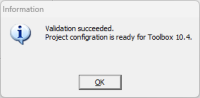
- If validation was successful you will be prompted the following message and you can proceed with the last step.
- If validation was not successful you will be prompted the following message.
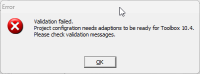
In this case please check the message(s) in theMessagesection and fix the issues pointed out. Afterwards start again at step 2.

- After successfull validation save the project with a new name. For example: “myprojectname_validated.dp10”
If the project is changed and saved again after successful validation, it is required to re-validate the project!


Steps in Toolbox 10.4
- Open the validated project in Toolbox v10.4.1 or higher 10.4.x
An internal migration routine updatesFader Channelswhich have configured theMic Inputin theMic Controltab. OnlyFader Channelsusing this specific configuration are affected.
In this case the previous audio-signal-based connection is migrated to the new API based adressing convention for theMic Input Addressfield:<ConnectionName>.<InputID>(for example Studio3.157) .
The new reference is derived from the previous audio source at theMic Inputfield by using the source's Device Name as<ConnectionName>, and using the related Audio-ID as<InputID>. If this migratedMic Input Addressshould not fit your needs you can change the value manually later.
- You may receive some
WARNINGmessages in the Messages Section. Those messages inform you if your Toolbox project is using no longer supported hardware, if other problems occurred or if adjustments were done during conversion of the project. A double click on the message leads you to the hardware module or part of the configuration that is subject of the message.
If required resolve listed issues.
- Save the config under a new name. E.g 10-4_myprojectname.dp10
We recommend to check the following settings/functionality afterwards:
- Fader Channel
Mic Controlsettings and related controls
Usage ofMic Controlacross devices, now additionially requires setup of aDevice Connectionfrom the controlling device to the device which holds the mic I/O module. The remote device also requires v10.4 installed.
Upgrade Instructions - Kernel & Firmware
Important - Upgrades/Downgrades between v10.3 ↔ v10.4
Due to the complex and interdependent changes in the firmware and kernel, it is essential to perform upgrades and downgrades only with the appropriate DeviceOS.
Under no circumstances should single .fw10 or .img files be used for such operation, as it will render the device unusable.
Note
The XC3 upgrade/downgrade takes takes approx. 3 minutes, and the device will restart itself finally in order to finish the process.
Do not switch off or restart the device during the update.
Note
The XD3 upgrade/downgrade takes approx. 2-3 minutes to finish. Do not switch off or restart the device during the update.
- Before upgrading to Version 10.4 ensure that the Core is updated to the latest Firmware 10.3 - minimum FW 10.3.11 / DeviceOS v10.3.11.
- Create a backup of your device. See System App documentation "Backup & Restore" for detailed information.
- Upload the current v10.4
DeviceOSto the device via theSystem App>Service>Update Devicemenu. See here for detailed information. - After the update: Upload the Toolbox 10.4 configuration into the device.
- Make sure mixer and surface are working as expected. Especially focus on the
Mic Controlsystem (if used) and the respective control elements.