Buses
On the Buses page you can configure the settings for all buses that are available in the SX2 system.
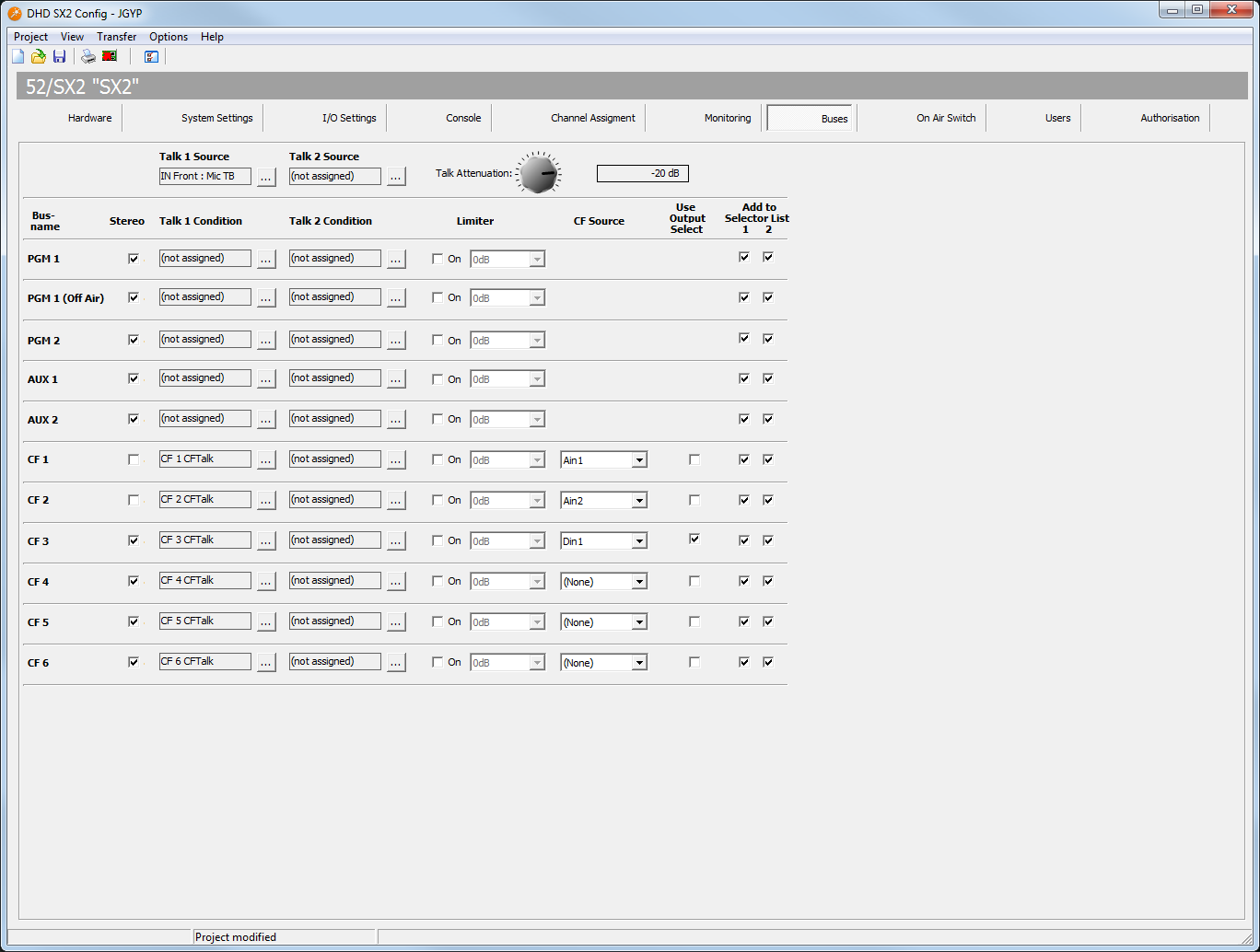
SX2Config Software - Buses
In the following tables, all options on this page are explained.
| element | description |
| Talk 1 Source | Click the  button, next to the button, next to the Talk 1 Source box. The Audio Sources window opens. Select an audio source from the list and click assign.When the Talk 1 Condition logic becomes true, the Talk 1 Source is active on the corresponding bus. |
| Talk 2 Source | Click the button, next to the Talk 2 Source box. The Audio Sources window opens. Select an audio source from the list and click assign.When the Talk 2 Condition logic becomes true, the Talk 2 Source is active on the corresponding bus. |
| Talk Attenuation | When a Talk Source is active, the busses can be attenuated between 0 dB and Off in steps of 1 dB. Use the Talk Attenuation selector to change the attenuation value. |
| column | description |
| Bus name | Here you can find the name of the bus for which you configure the following settings. |
| Stereo | Select this check box, if the bus is stereo. Clear the check box to configure the bus as mono. |
| Talk 1 Condition | Click the button, next to the Talk 1 Condition box. The Logic Sources window opens. Select a logic source from the list and click assign.When this logic source becomes true, the Talk 1 Source is active on the corresponding bus. |
| Talk 2 Condition | Click the button, next to the Talk 2 Condition box. The Logic Sources window opens. Select a logic source from the list and click assign.When this logic source becomes true, the Talk 2 Source is active on the corresponding bus. |
| Limiter | Select the On check box to activate the limiter for this bus. Select a threshold value from the drop-down menu (-30 dB to 20 dB). |
| CF Source | Select from the drop-down menu an audio source for your clean feed signal |
| Use Output select | Select this check box to enable source selection for the alternative clean feed signal. |
| Add to Selector List 1 | Select this check box to add a bus to source list 1. This bus will be available in the monitor source list, which is assigned to the SEL key on 52-5614 central module. |
| Add to Selector List 2 | Select this check box to add a bus to source list 2. This bus will be available for monitoring in the Monitor 2 list, which is available in the Monitor Selector  view of the TFT/Touch Display. view of the TFT/Touch Display. |